

Best Time to Send a WhatsApp Broadcast in India (2026 Guide)

Written by
WappCloud Team

Post date
25 August 2026
Even a well-written WhatsApp broadcast can fall flat if it lands while someone is in a meeting, stuck in traffic, or asleep. To earn a click, a reply, or a purchase, your message needs to reach people at a moment when they actually have a few minutes to spare.
WhatsApp is already where Indian consumers talk to businesses — most people who chat with a brand on the app do it weekly, not occasionally. That makes send timing one of the highest-leverage, lowest-cost levers in your WhatsApp marketing plan.
The Short Answer
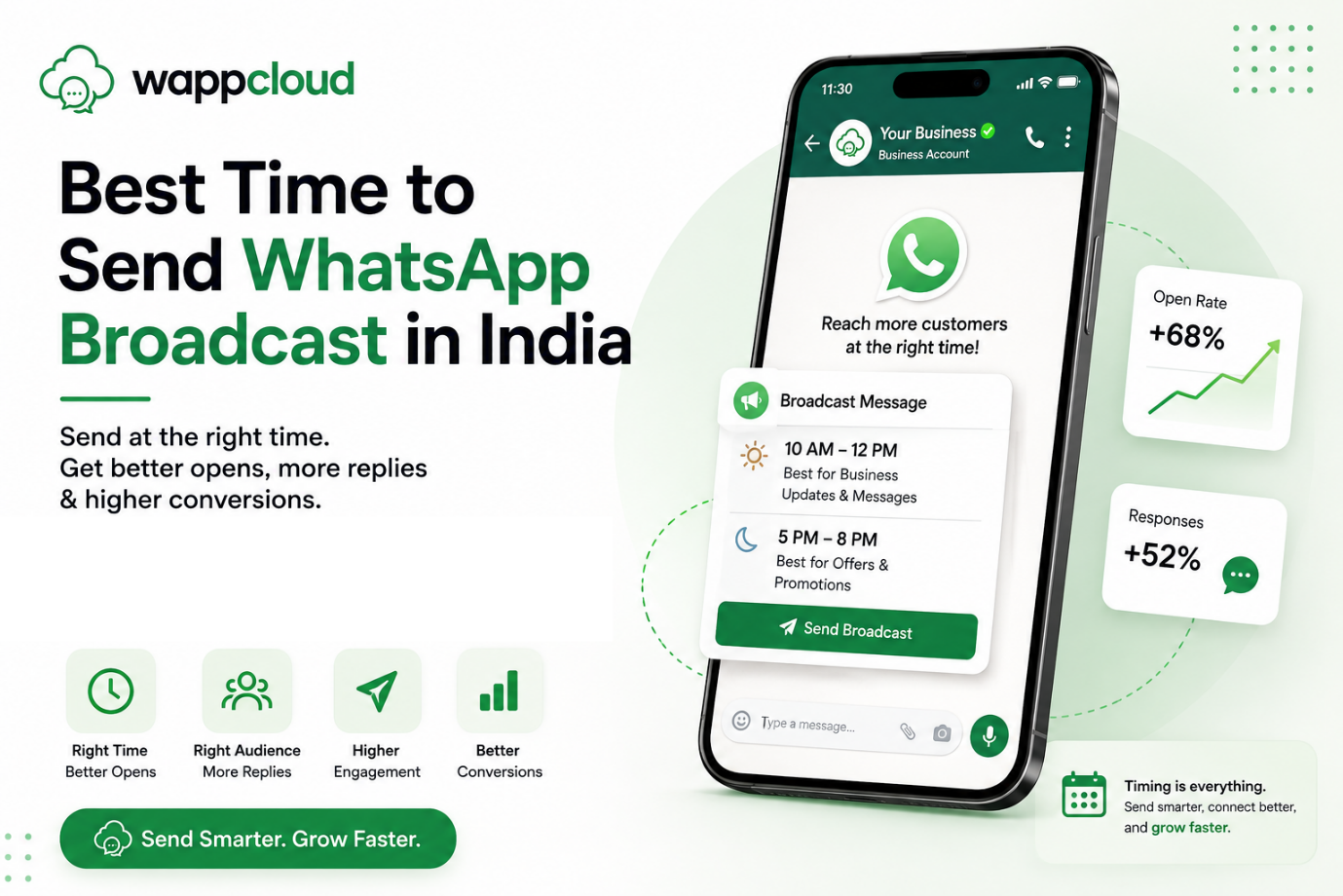
Start by testing 10 AM–12 PM and 5 PM–8 PM. From there, timing should flex around your audience, your industry, and what you're asking the customer to do.
This guide walks through send-time benchmarks by day, industry, campaign type, and time of month, and shows how WappCloud's scheduler helps you put the findings into practice instead of sending everything manually.
Why WhatsApp Broadcast Timing Matters
Every customer's phone is a battlefield for attention — notifications from family group chats, colleagues, delivery apps, and your broadcast are all competing for the same few seconds of a scroll. Land at the right moment and a customer has room to notice the message, read the offer, and act on it. Land at the wrong one, and even a strong discount gets swiped away unread.
A lunch deal sent at 2 PM arrives after people have already eaten. A promotional ping at 11 PM reads as an intrusion rather than an offer. Good timing doesn't fix a weak message — but it's what lets a good one actually convert, alongside the rest of your WhatsApp broadcast playbook.
The Best General Windows for India
As a starting point across most consumer and B2B audiences, three broad windows are worth testing first:
- 9 AM – 12 PM — the start-of-day check-in
- 12 PM – 2 PM — lunch and short breaks
- 5 PM – 8 PM — the end-of-workday wind-down
These line up with when people naturally reach for their phones. But no single window fits every business — the right one depends on your audience, your industry, and the goal of the specific campaign.
| Day | Recommended Window | Why It Tends to Work | Best Suited For |
|---|---|---|---|
| Mon–Fri | 9 AM – 12 PM | People have settled into the day but aren't yet buried in back-to-back work. | B2B outreach, product updates, lead nurturing, appointment reminders |
| Mon–Fri | 12 PM – 2 PM | Lunch or a short break is a natural phone-check moment. | Lunch deals, quick promos, webinar reminders, flash updates |
| Mon–Fri | 5 PM – 8 PM | The workday is winding down and there's more room to browse or buy. | Ecommerce, retail, food, beauty, fitness, lifestyle campaigns |
| Saturday | 10 AM – 1 PM | Weekend mornings are often set aside for planning errands and outings. | Weekend sales, salons, restaurants, travel, local retail |
| Sunday | 10 AM – 12 PM | Time to explore before the day fills up. | Launches, education, fitness, ecommerce, family offers |
| Sunday | 4 PM – 7 PM | People start thinking ahead to the week — a good moment for reminders. | Bookings, weekly reminders, course promos, last-chance offers |
Treat these as tested starting points, not guarantees — validate them against your own campaign data.
How Weekday Attention Rises and Falls
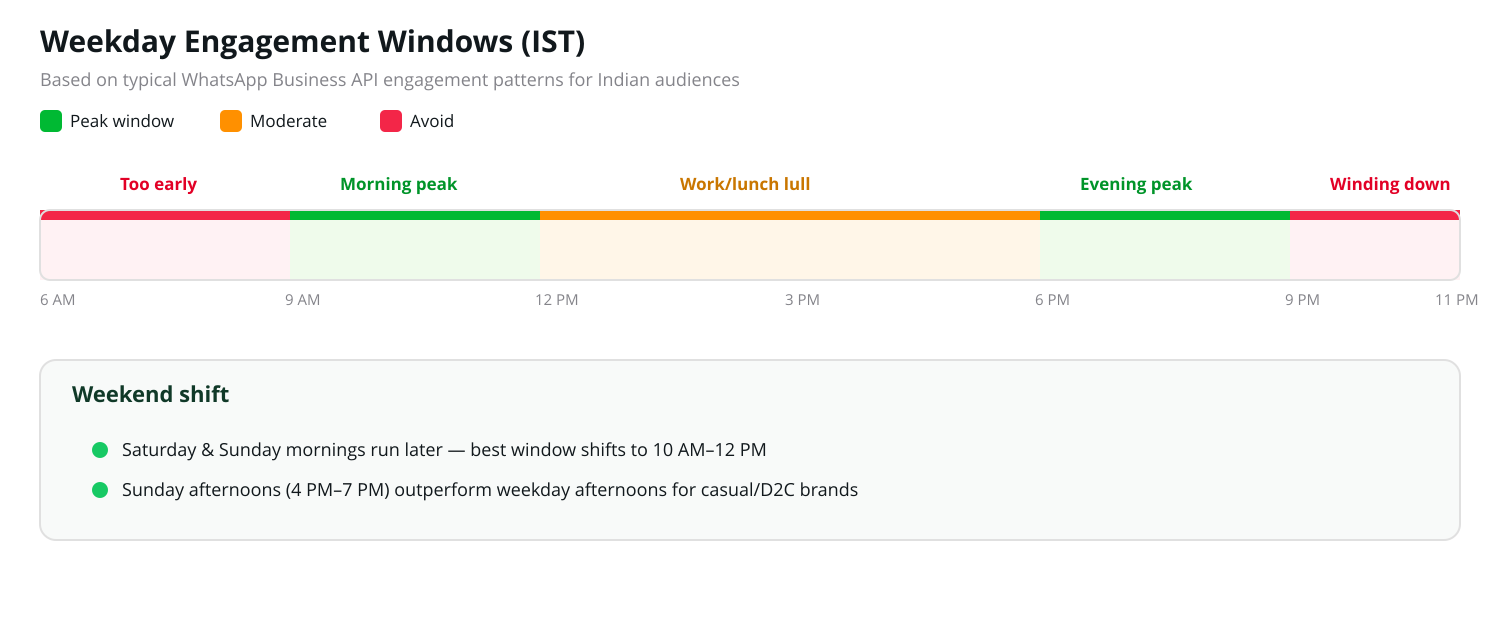
A rough map of when Indian WhatsApp audiences are most reachable on a typical weekday.
Match the Send Time to Who You're Talking To
Two customers can have very different "free" hours, so audience routine matters as much as the clock:
- College students often engage more after 5 PM, once classes wrap up.
- Working professionals check messages during lunch or right after logging off.
- Business owners tend to respond during late mornings, between meetings.
- Parents get freer after school pick-up hours.
- Online shoppers browse more in the evening, when they can compare at leisure.
- Restaurant customers respond best just ahead of lunch or dinner decisions.
- B2B buyers are most reachable within standard business hours.
An 11 AM slot might be perfect for a demo invite but wasted on a dinner offer; a 6 PM ecommerce sale might arrive too late for a B2B consultation ask. Segment your list, and let audience behaviour — not just the clock — drive the send time.
Pick the Time Based on What You Want the Customer to Do
| Campaign Goal | Suggested Starting Time |
|---|---|
| Read a business update | 9 AM – 11 AM |
| Book a demo or consultation | 10 AM – 12 PM |
| Order lunch | 11 AM – 1 PM |
| Shop an ecommerce sale | 5 PM – 8 PM |
| Book a weekend appointment | Thu/Fri, 4 PM – 7 PM |
| Register for a webinar | 10 AM–12 PM or 5 PM–7 PM |
| Respond to a payment reminder | 10 AM – 1 PM |
| Order dinner | 5 PM – 7 PM |
Best Time by Campaign Type
Use these as a first draft, then refine using your own delivery, read, click, and conversion data.
| Campaign Type | Timing | Why | Approach |
|---|---|---|---|
| Promotional offers | 10 AM–12 PM or 5 PM–8 PM | Customers have time to browse, compare, and buy. | Use for discounts, seasonal promos, coupons — send early enough that people can act before it expires. |
| Flash sales | 11 AM–1 PM or 6 PM–8 PM | Urgency still needs a window long enough to act in. | Announce hours ahead of expiry; retarget engaged-but-not-converted customers rather than blasting everyone again. |
| Product launches | 10 AM–12 PM | Gives customers the whole day to explore. | Tease a day early, launch late morning, follow up with interested customers that evening. |
| Abandoned cart reminders | 15–30 min after, a few hours later, next day | Intent already exists — follow the behaviour, not the clock. | First nudge soon after abandonment, a follow-up later, and auto-stop once the purchase completes. |
| Payment reminders | Daytime, or shortly before the deadline | People need time to review and pay. | Include amount, due date, and a direct pay link; avoid early mornings and late nights unless urgency demands it. |
| Appointment reminders | 1 day before, then 2–3 hrs before | Cuts no-shows and gives room to reschedule. | Include date, time, location, and a reschedule option; send updates instantly if plans change. |
| Event / webinar reminders | 1 day, 1 hour, and 10–15 min before | Multiple touches keep the event top of mind. | Put details early, and the join link in the final nudge. |
| Order & delivery updates | Immediately on status change | These are expected in real time. | Send confirmations, shipping, delivery, and refund updates the moment they happen. |
| Feedback requests | After the customer has actually used the product | Feedback is only useful once there's something to say. | Ask soon after a restaurant/salon visit; wait longer for electronics, courses, or skincare. |
Best Time by Industry
Every industry runs on a different customer clock. Use this as a starting benchmark for your sector:
| Industry | Timing | Why | Best Suited For |
|---|---|---|---|
| Ecommerce | 10 AM–12 PM & 6 PM–8 PM | Breaks and post-work hours suit browsing and comparing. | Launches, sales, restock alerts, weekend campaigns |
| Restaurants / cloud kitchens | 11 AM–1 PM & 5 PM–7 PM | Reaches people right before meal decisions. | Meal deals, combos, new menu drops, repeat-order nudges |
| Salons & spas | 10 AM–12 PM & 4 PM–7 PM | Bookings get planned on breaks or after work. | Weekend slots, offers, seasonal packages, memberships |
| Education & coaching | 4 PM–8 PM weekdays, 10 AM–1 PM weekends | Students and parents free up after school/work. | Admissions, demo classes, fee reminders, webinars |
| Real estate | 10 AM–1 PM & 4 PM–6 PM | Buyers can review listings and talk to your team. | New listings, site visits, consultations, updates |
| Healthcare | 9 AM–11 AM | Morning gives patients room to plan the day around it. | Appointment slots, camps, follow-ups, checkups |
| B2B | Tue–Thu, 10 AM–12 PM or 2 PM–4 PM | Decision-makers are settled but not yet winding down. | Demos, case studies, renewals, lead nurturing |
| Local retail | 11 AM–1 PM & 5 PM–8 PM | Offers get noticed before an in-store visit. | New arrivals, festival sales, restock alerts |
| Travel | 11 AM–2 PM & weekend mornings | Trip planning needs unhurried browsing time. | Packages, flight/hotel deals, seasonal campaigns |
| Fitness | 7 AM–9 AM & 5 PM–8 PM | Brackets around workout routines. | Trials, class schedules, membership offers, renewals |
A Closer Look at Four Sectors
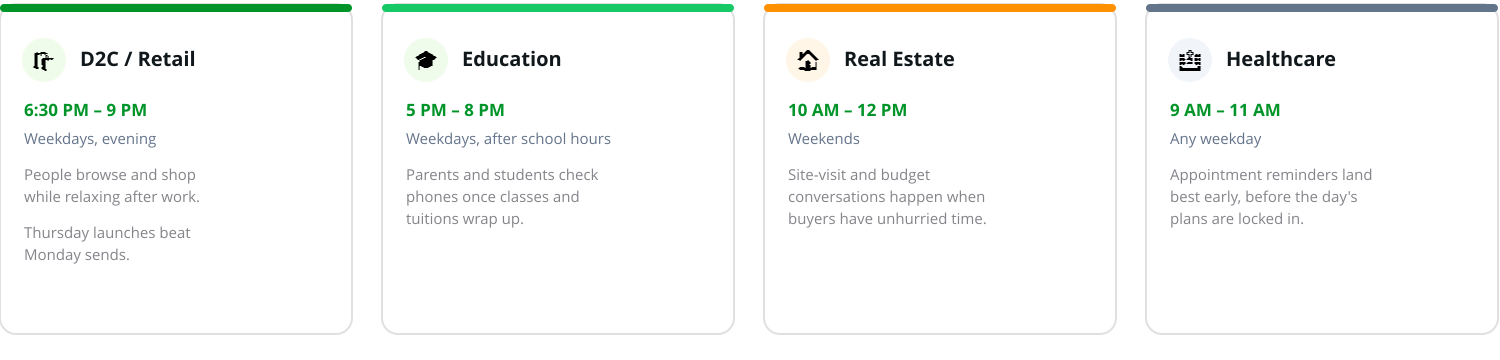
Sector-specific windows worth testing first, before you tune to your own data.
Best Day of the Week to Send
| Day | Best Suited For | Why | Approach |
|---|---|---|---|
| Monday | Weekly schedules, appointment reminders, urgent updates | Attention is on meetings and weekly planning. | Skip broad promos early; use Monday for useful, timely updates. |
| Tue–Thu | Lead follow-ups, demos, webinars, B2B promos | The week has settled in and people are more receptive. | Test late mornings and early afternoons for B2B sends. |
| Friday | Restaurant, travel, salon, weekend sale offers | Weekend planning starts here. | Send early enough for people to make plans. |
| Saturday | Ecommerce, retail, restaurants, salons, events | More free time to browse, shop, and book. | Test Saturday mornings and early afternoons. |
| Sunday | Education, fitness, ecommerce, grocery, family offers | Time to explore or wrap up pending purchases before Monday. | Test 10 AM–12 PM and 4 PM–7 PM. |
Timing Across the Month
| Point in Month | Best Suited For | Why | Approach |
|---|---|---|---|
| Around salary days | Fashion, electronics, beauty, travel, fitness, home | Spending flexibility tends to rise after payday. | Test in the final week of the month, benchmarked against other weeks. |
| Ahead of festivals & sales | Festival offers, gifting, launches, store sales | Customers need time to discover, compare, and buy. | Teaser 5–7 days out, main offer 2–3 days out, final reminder on the last day. |
| Reorder cycles | Skincare, supplements, pet food, groceries, salons | Messages land best near the moment of actual need. | Personalise reminders to average usage — e.g. skincare ~30 days, supplements ~25–30 days. |
Five Factors Worth Weighing Before You Lock a Schedule
1. Know your customer's daily routine
Age, occupation, and lifestyle all shape when someone has a spare moment. Ask when your audience starts and ends work, when they take breaks, and when your own team can actually respond.
2. Match timing to intent, not just the clock
Promotions do best when people have time to compare and buy. Behaviour-based messages — like an abandoned-cart nudge — should follow the action, not a fixed slot. Transactional updates should go out immediately, always.
3. Separate weekdays from weekends and avoid busy hours
Skip early weekday mornings, commute windows, school or work hours, and late night for anything promotional.
4. Factor in industry, festivals, and events
A restaurant should beat the lunch decision; a coaching centre should dodge school hours; a B2B brand should stay inside working hours. Layer in Indian festivals, holidays, big cricket matches, and salary cycles — and give people enough runway to plan and buy.
5. Let past performance settle the debate
Benchmarks are a starting point; your own delivery, read, click, reply, conversion, revenue, and opt-out numbers are the real answer. Send the same message to comparable segments at two different times and compare — repeat this across campaigns until the pattern is clear, not assumed.
One More Thing: Frequency Capping Changes the Math
Meta limits how many marketing messages a single user can receive in a given window. Once you're broadcasting regularly, that cap constrains results more than the send hour does — a perfectly timed message that exceeds the cap simply never arrives. Check your send frequency before you fine-tune timing.
Put It Into Practice with WappCloud
Once you've found the windows that work for your audience, you shouldn't have to launch every broadcast by hand. WappCloud's scheduler lets you queue campaigns in advance, pick the exact date, time, and timezone, and let the platform send automatically — so testing timing becomes routine instead of a one-off exercise.
With WappCloud, you can:
- Schedule broadcasts well ahead of time and edit, reschedule, or cancel before they go out.
- Segment audiences and personalise sends by interest, purchase history, or past engagement.
- Track delivery, read, click, reply, and conversion rates from one dashboard.
- Compare performance across different send windows to find what actually works.
- Pair scheduling with automation to trigger follow-ups off customer behaviour.
Scheduled broadcasts run on Meta-approved templates through your WhatsApp Business API account connected to WappCloud, so plan ahead for template approval time.
There's no single best time to send a WhatsApp broadcast in India — it depends on your audience, industry, and campaign goal. Start by testing 10 AM–12 PM and 5 PM–8 PM, then let your own delivery, read, and conversion data tell you where to adjust.
With WappCloud's scheduler, you can plan those tests properly — queue campaigns in advance, pick the right moment, and track what actually moves the needle, all from one dashboard.