

WhatsApp Message Templates: Best Practices, Examples, and How WappCloud Boosts Your Business Communication

Written by
WappCloud Team

Post date
19 May 2026
Think about the last time you received a WhatsApp message from a business. Did you open it right away, or did you ignore it? Chances are, the way that message was written influenced your reaction.
That's the reality for businesses today. Customers live on WhatsApp—it's the app they check first thing in the morning and the last thing before bed. But not every business message gets attention. The difference lies in how you design your templates.
At WappCloud, we've seen hundreds of businesses succeed (and fail) with WhatsApp templates. Through those stories, a clear pattern has emerged: some best practices that separate ignored messages from ones that spark replies, clicks, and conversions.
What is a WhatsApp Template?
A WhatsApp message template is a pre-approved message format that businesses can use to communicate with their customers on WhatsApp. Instead of writing the same message over and over, brands can create these reusable templates for common situations like:
- Promoting new deals and discounts
- Announcing sales or product launches
- Sending order confirmations and updates
- Following up on previous purchases
- Reminding customers about appointments or payments
Think of it as a ready-to-use message structure—clear, consistent, and professional—that saves time and ensures compliance with WhatsApp's policies.
For example:
"Hi [Customer Name], 🎉 our new [Product Name] is now available! Get yours today with an exclusive [X%] discount. Tap below to shop 👉 [Button: Shop Now]."
With platforms like WappCloud, businesses don't just get the templates—they also get tools to personalize them, add quick-reply buttons, schedule them at the right time, and track how well they perform.
Understanding the Different Parts of a WhatsApp Message Template
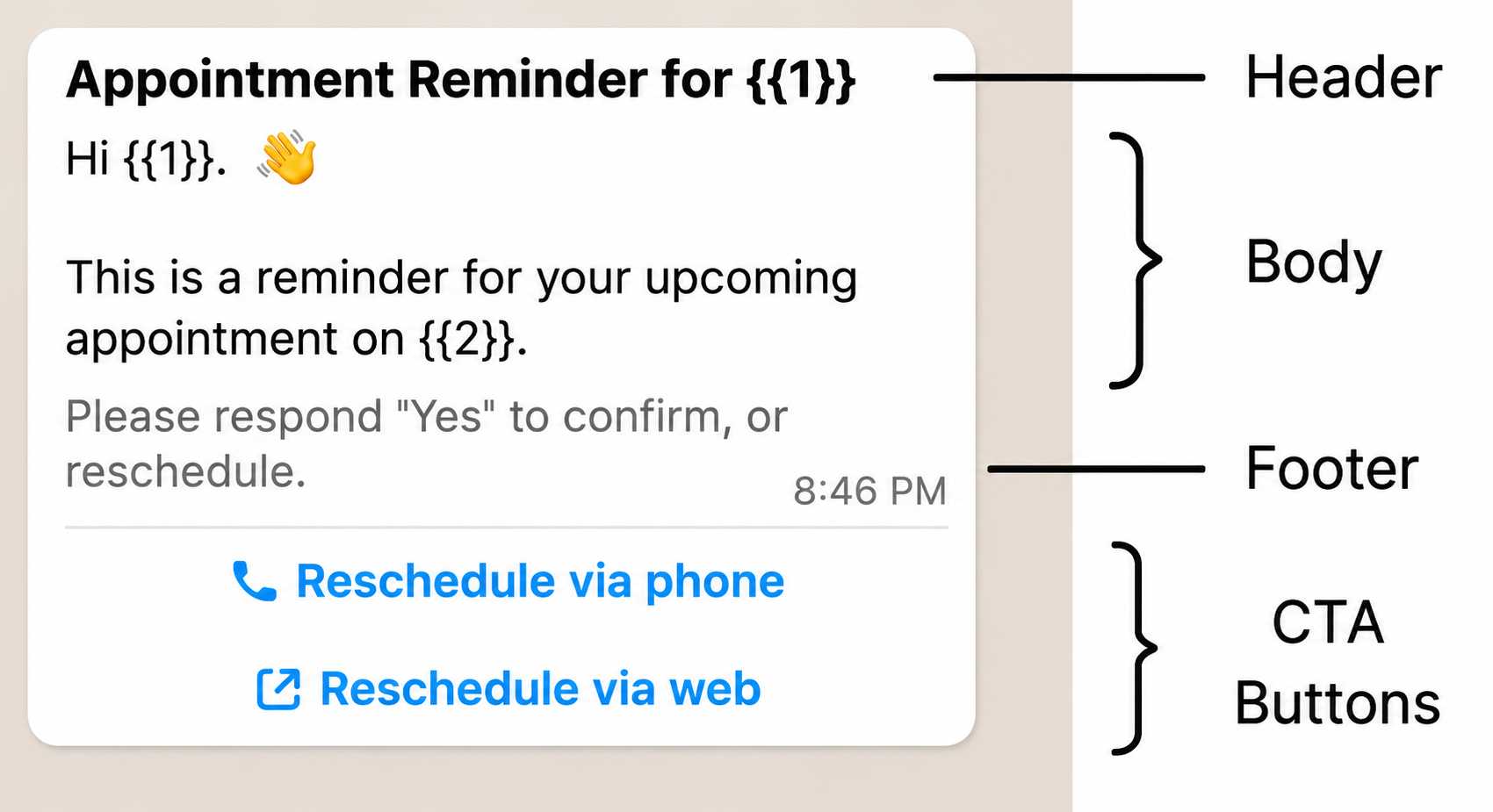
A WhatsApp message template isn't just a simple text—it's a structured tool that helps your business communicate efficiently and professionally. Let's break down its key components:
1. Header
The header is the first thing your customer notices. While optional, it's a great place to include images, documents, PDFs, or videos alongside your text. Eye-catching visuals or useful attachments make your message stand out and grab attention immediately. With WappCloud, adding headers to your templates is simple, letting you get creative without any technical hassle.
2. Body
The body is the heart of your template—it's where your main message lives. This section can include plain text, personalized placeholders (like customer name, order ID, or product), and the core information you want to convey. Whether it's a promotional offer, an order confirmation, or a reminder, the body ensures your message is clear, professional, and engaging.
3. Footer
The footer is a subtle but effective way to reinforce your brand or leave a lasting impression. It can include:
- Your brand name or tagline
- A short signature line
- A key takeaway or call-to-action
Think of it as the final touch that makes your message feel complete and trustworthy.
4. Buttons
Templates can include interactive buttons to make messages actionable and dynamic. These can be:
- Call-to-Action buttons like "Shop Now" or "Track Order"
- Quick Reply buttons like "Yes / No" or "Confirm / Reschedule"
Buttons bring interactivity to your messages, turning a simple template into a tool that encourages clicks, responses, and conversions. WappCloud makes it easy to add these buttons, letting your messages do more than just inform—they engage and sell.
Best Practices for Creating WhatsApp Message Templates
Creating a WhatsApp template isn't just about typing a message—it's about crafting a professional, clear, and engaging communication that customers will actually respond to. Plus, WhatsApp has strict rules, so templates that aren't structured properly often get rejected.
- Keep It Simple – Clear, concise messages always perform best.
- Proofread – No grammar or spelling mistakes.
- Check Formatting – Ensure placeholders like are correct.
- Use Full URLs – Avoid short links; use official business URLs.
- Name Templates Properly – Only lowercase letters, numbers, and underscores.
- Use Consistent Language – Stick to one language per template.
- Tag Correctly – Select the right language and category.
- Avoid Abusive Content – Keep messages friendly and professional.
- Follow WhatsApp Policies – Only approved transactional or service messages.
- Use Engaging Visuals – Make images or media attractive and relevant.
With WappCloud, creating compliant, effective templates is easy. Add personalization, buttons, headers, and footers, schedule your messages, and track results—all in one platform.
Examples of WhatsApp Templates
1. User Welcome / Account Update
Hello , Welcome to WappCloud!
The WappCloud Team
2. Appointment / Event Reminder
Hi , Your appointment with is scheduled for . Please confirm or reschedule if needed.
3. Order / Shipping Updates
Hi , Your order # has been shipped! It's expected to arrive by . Track your shipment here:
4. Reservation / Booking Updates
Hello , Your table reservation at is confirmed for . We look forward to serving you!
These templates are flexible and reusable. With WappCloud, you can add buttons, headers, and footers to make them interactive, schedule them to send at the perfect time, and even track how well they perform.
Using templates like these ensures your messages are professional, consistent, and engaging—turning WhatsApp conversations into conversions.
Why Smart Businesses Use WhatsApp Templates
Reliable Messaging
Every customer deserves the same level of professionalism. Templates ensure your messages are consistent, polished, and on-brand, every single time.
Crystal-Clear Communication
Forget misunderstandings. Templates help you communicate your offers, updates, or instructions in a way that's simple and easy to understand.
Save Time, Work Smarter
Typing repetitive messages is a thing of the past. Templates let your team respond faster, freeing up time for more important tasks.
Organized & Standardized
From confirmations to reminders, templates keep your WhatsApp Business account structured. Standard replies mean fewer mistakes and smoother customer interactions.
Boost Customer Experience
When messages are timely, relevant, and well-written, customers feel cared for. Templates help you maintain that seamless experience across every conversation.
Think of WhatsApp templates as a secret productivity tool for your business. They let you send messages that are consistent, professional, and effective—without the stress of writing each one from scratch.
With templates, every chat becomes an opportunity to impress your customer, save time, and boost engagement. In short: smarter messaging, happier customers, better results.
Creating compliant, professional templates can be tricky—especially if you're managing multiple messages and campaigns. WappCloud simplifies the entire process:
- Easily create templates with correct formatting and placeholders
- Add personalization, headers, footers, and buttons without hassle
- Ensure compliance with WhatsApp's policies and categories
- Track approval status and performance metrics
With WappCloud, your WhatsApp templates aren't just approved—they're optimized for engagement and conversions.
Ready to create templates that work every time?
Ready to turn your WhatsApp messages into meaningful conversations that actually drive results? With WappCloud, it's easier than ever to create, manage, and track your WhatsApp templates. Explore all features at www.wappcloud.com
Don't just send messages—start conversations that convert. See WappCloud in action and discover how it can simplify WhatsApp marketing for your business.